
Windows下打造超级好用漂亮且好用的终端(功能类似OhMyZsh)
1.前置工作
1.1.安装最新版PowerShell
- 传送门: https://aka.ms/PSWindows
- 这里以
winget为例演示,搜索最新版本的 PowerShell
winget search --id Microsoft.PowerShell- 使用 --id 参数安装 PowerShell 或 PowerShell 预览版
winget install --id Microsoft.PowerShell --source winget # 安装最新版winget install --id Microsoft.PowerShell.Preview --source winget # 安装预览版1.2.终端设置
- 点如下位置进入终端设置界面
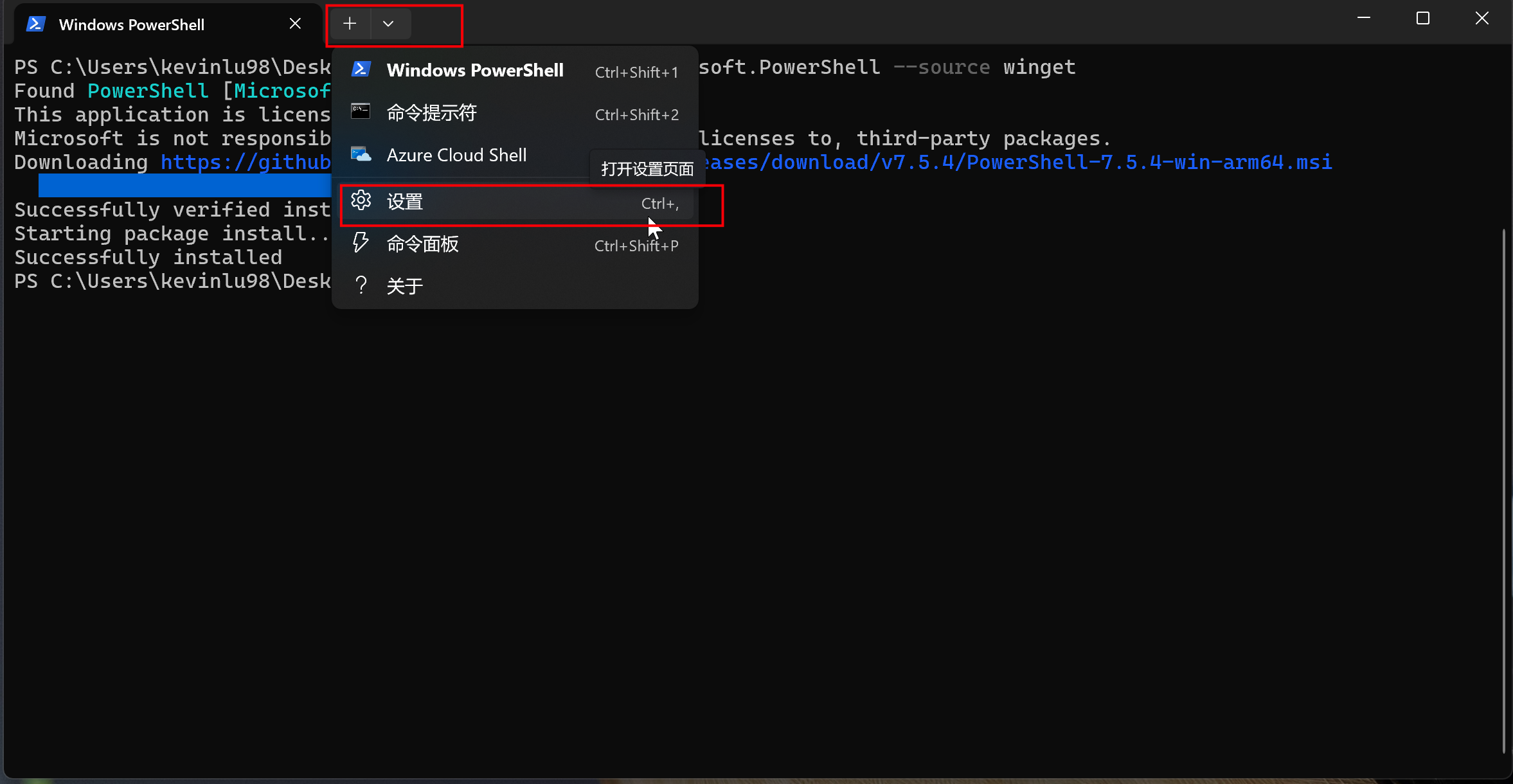
1.2.1.修改默认终端
- 在
设置>启动>默认配置文件中将PowerShell设置为默认,注意不是Windows PowerShell - 在
设置>启动>默认终端应用程序中选择Windows终端 - 点击保存,最终效果如下
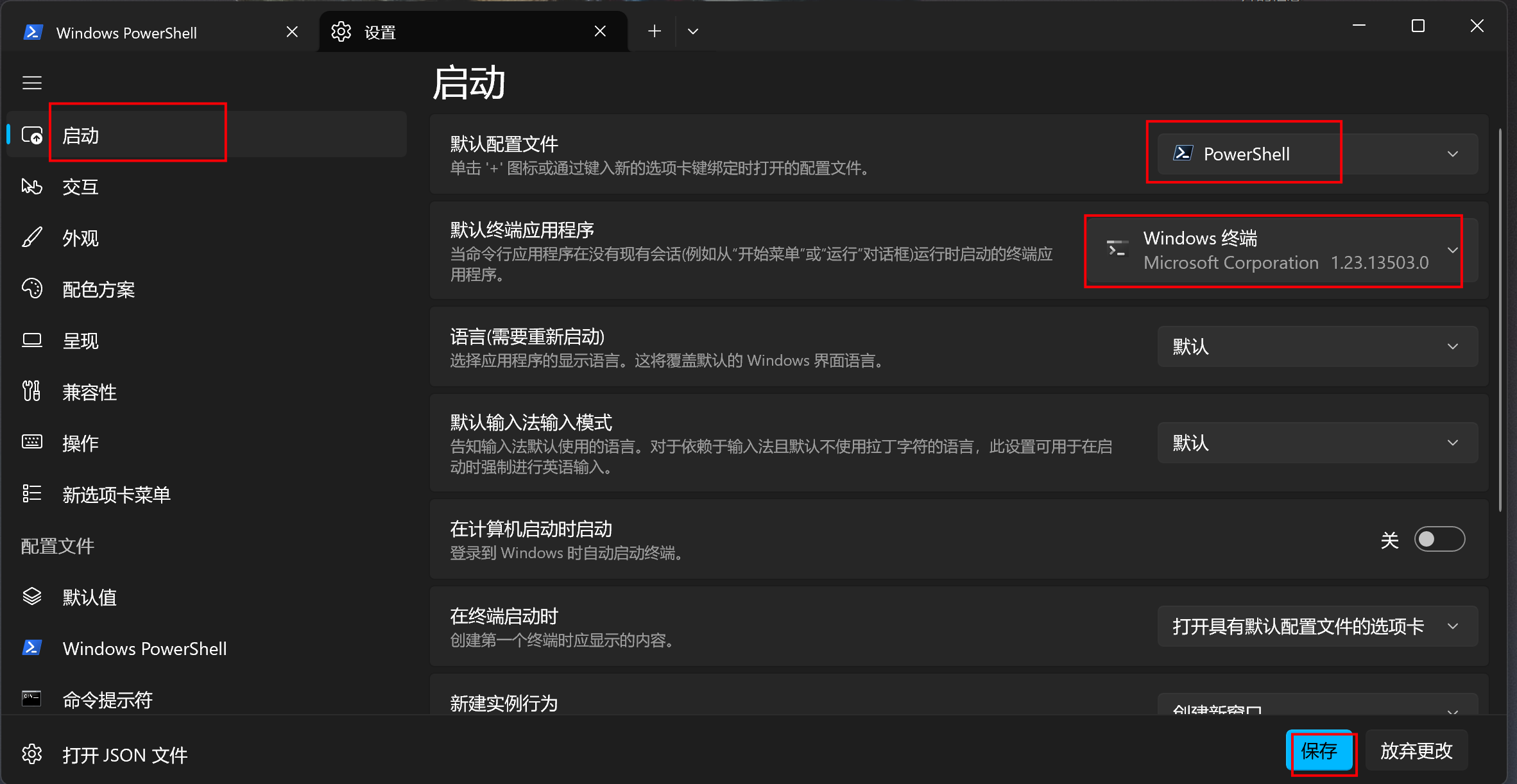
1.2.2.修改配色方案
- 在
设置>配色方案中找到喜欢的配色文字,然后点进去,这里我以One Half Dark为例
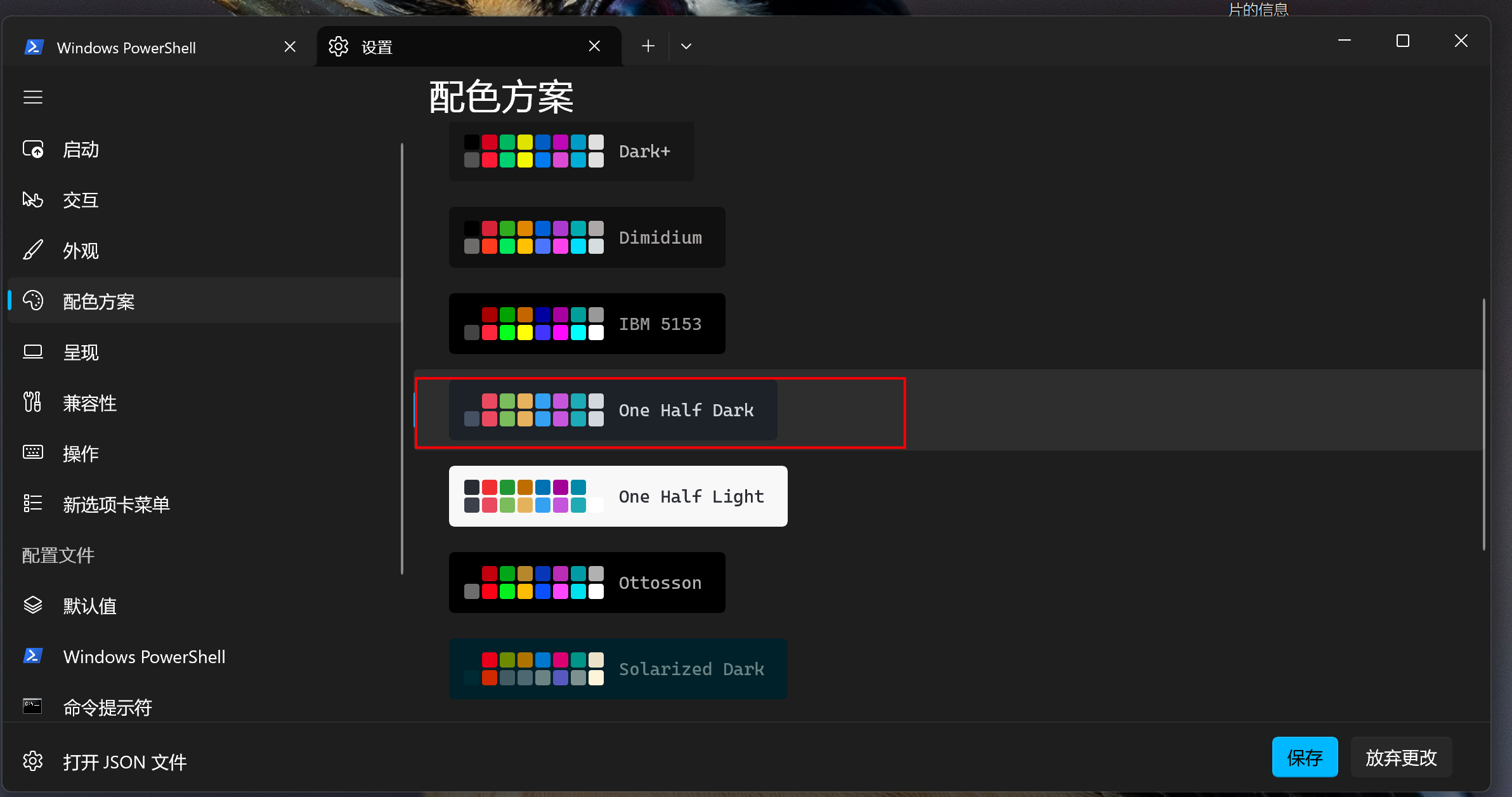
- 在新页面中点击
将配色方案设置为默认,然后点保存
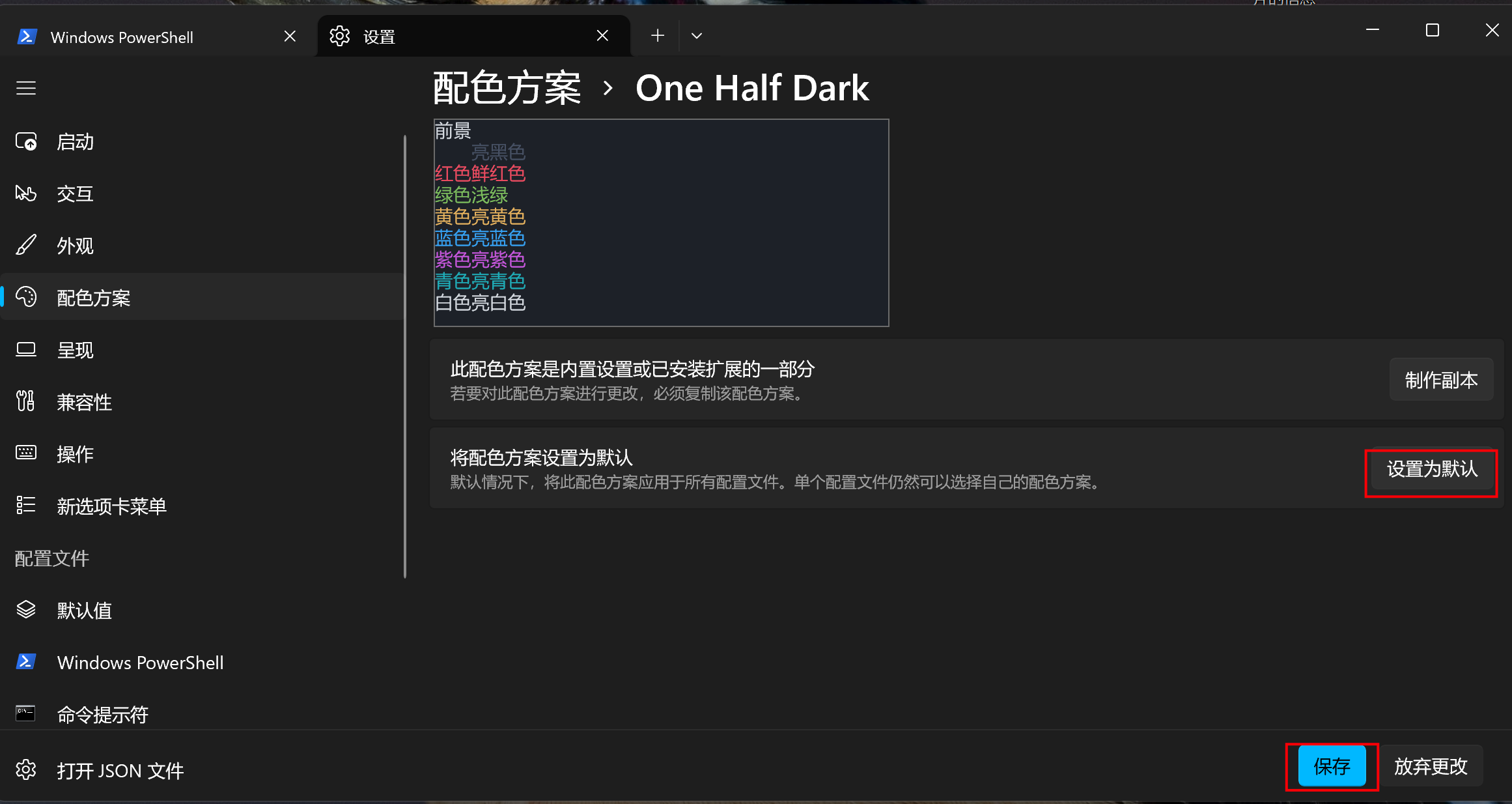
1.2.3.修改快捷键
在
设置>操作中可以自定义快捷键,这个根据个人喜好来,这里我一般会加两个快捷键如下:Ctrl+Q退出终端Ctrl+W关闭窗格
1.2.4.配置文件外观设置
- 点
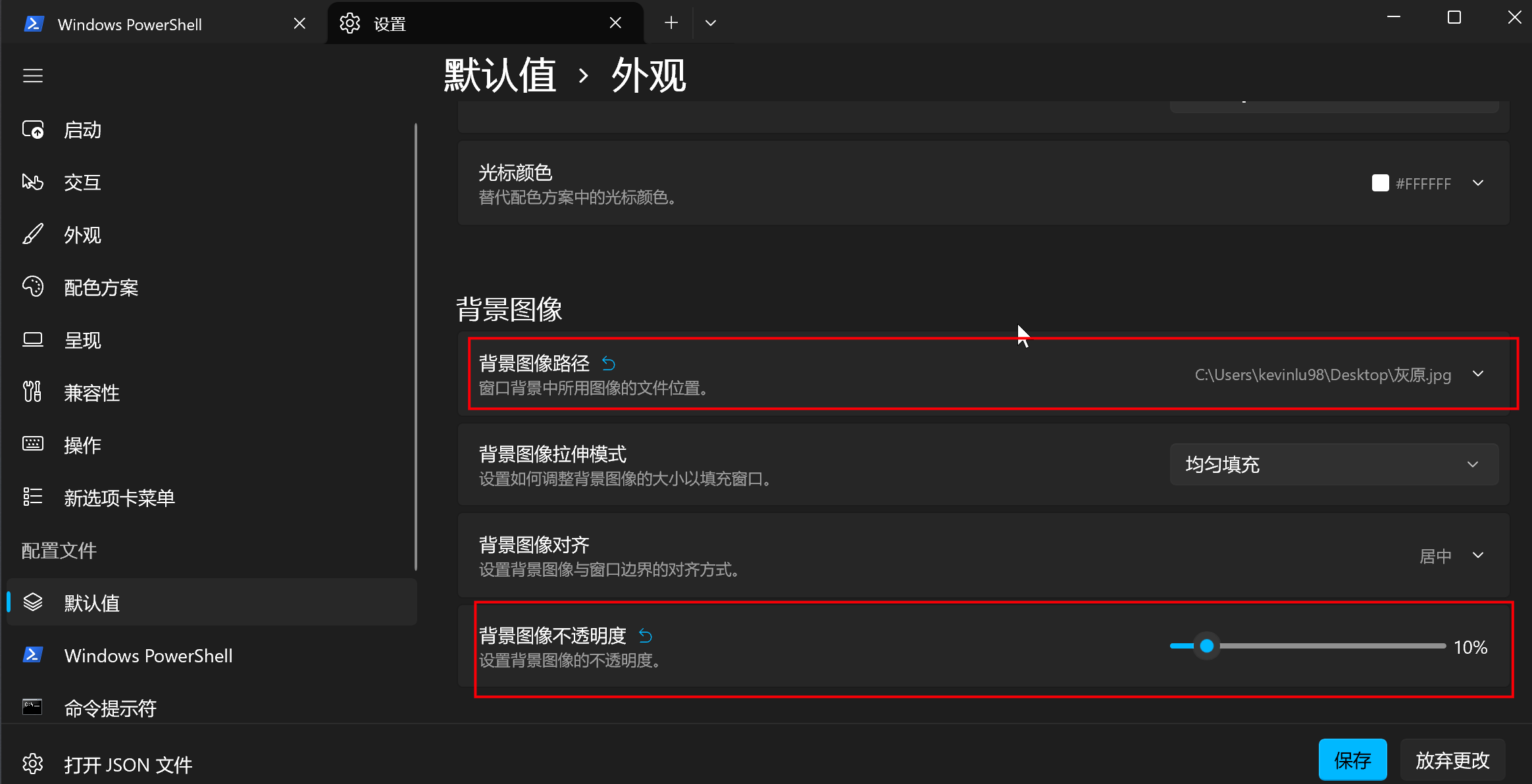
设置>配置文件>默认值>外观中进行设置,可以设置字体、字号、粗细等,这里我保持默认,大家根据需求来 - 然后在
背景图片中可以设置背景图及不透明度,如果图片比较亮就推荐将不透明度调低,设置完好点保存,如下
1.3.安装Scoop包管理工具
- 在
PowerShell中执行如下命令
Set-ExecutionPolicy RemoteSigned -scope CurrentUser
Invoke-Expression (New-Object System.Net.WebClient).DownloadString('https://get.scoop.sh')
2.Oh My Posh安装配置
2.1.安装
- 官网传送门: https://ohmyposh.dev/docs/installation/windows
- 在
PowerShell中执行如下命令进行安装
winget install JanDeDobbeleer.OhMyPosh --source winget- 安装Oh My Posh字体,会有字体列表,我这里以官方示例中的
meslo字体为例
oh-my-posh font install2.2.配置 Oh My Posh
- 执行如下命令打开配置文件
notepad $PROFILE- 如果报文件不存在则使用如下命令进行创建
New-Item -Path $PROFILE -Type File -Force2.3.配置主题
- 主题列表:https://ohmyposh.dev/docs/themes
- 可以在
C:\Program Files\WindowsApps\ohmyposh.cli_xxxx\themes\中找到对应的文件 - 在配置文件配置自己喜欢的主题,比如我喜欢
robbyrussell这款主题
# oh-my-posh init pwsh --config "C:\Program Files\WindowsApps\ohmyposh.cli_xxx\themes\主题文件" | Invoke-Expression

oh-my-posh init pwsh --config "C:\Program Files\WindowsApps\ohmyposh.cli_29.0.2.0_arm64__96v55e8n804z4\themes\robbyrussell.omp.json" | Invoke-Expression
3.其它配置
此时终端已经美化的差不多了,但我们还需要丰富其功能让它更接近Oh My Zsh
3.1.安装Git
- 如果你已经安装了
Git Bash可以忽略这一步
scoop install git3.2.安装Vim
- 执行如下命令安装
scoop install vimVim安装目录在C:\Users\kevinlu98\scoop\apps\vim\xxxx,可以创建配置文件_vimrc- 在
_vimrc中输入如下内容
set fileencodings=utf-8,ucs-bom,cp936,big5
set fileencoding=utf-8
set nu
syntax on
3.3.历史命令提示(类似zsh-autosuggestions)
- 通过
PSReadLine实现zsh-autosuggestions插件的功能 - 通过如下命令安装
ESReadLine
Install-Module -Name PowerShellGet -Force- 在主题配置文件后加入
Import-Module PSReadLine
# 设置预测文本来源为历史记录
Set-PSReadLineOption -PredictionSource History
# 设置 Tab 为菜单补全和 Intellisense
Set-PSReadLineKeyHandler -Key "Tab" -Function MenuComplete
# 每次回溯输入历史,光标定位于输入内容末尾
Set-PSReadLineOption -HistorySearchCursorMovesToEnd
# 设置向上键为后向搜索历史记录
Set-PSReadLineKeyHandler -Key UpArrow -Function HistorySearchBackward
# 设置向下键为前向搜索历史纪录
Set-PSReadLineKeyHandler -Key DownArrow -Function HistorySearchForward
3.4.目录跳转(类似autojump)
ZLocation和 autojump 差不多效果,快速 cd 到历史去过的目录- 安装
ZLocation
Install-Module ZLocation -Scope CurrentUser3.5.移除LOGO
- 进入设置面板
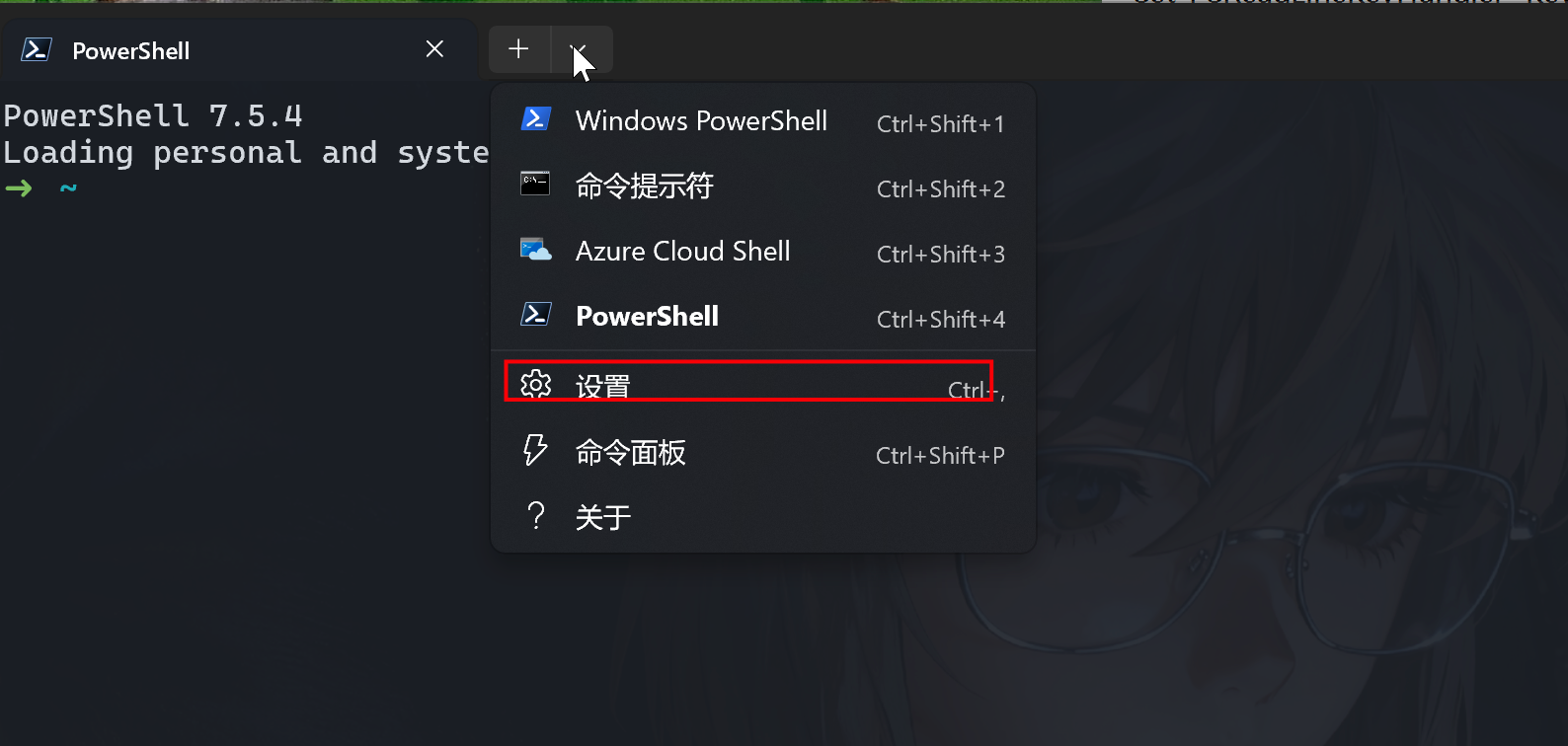
- 在
设置>配置文件>PowerShell>命令行中在原来的值后面加上-nologo
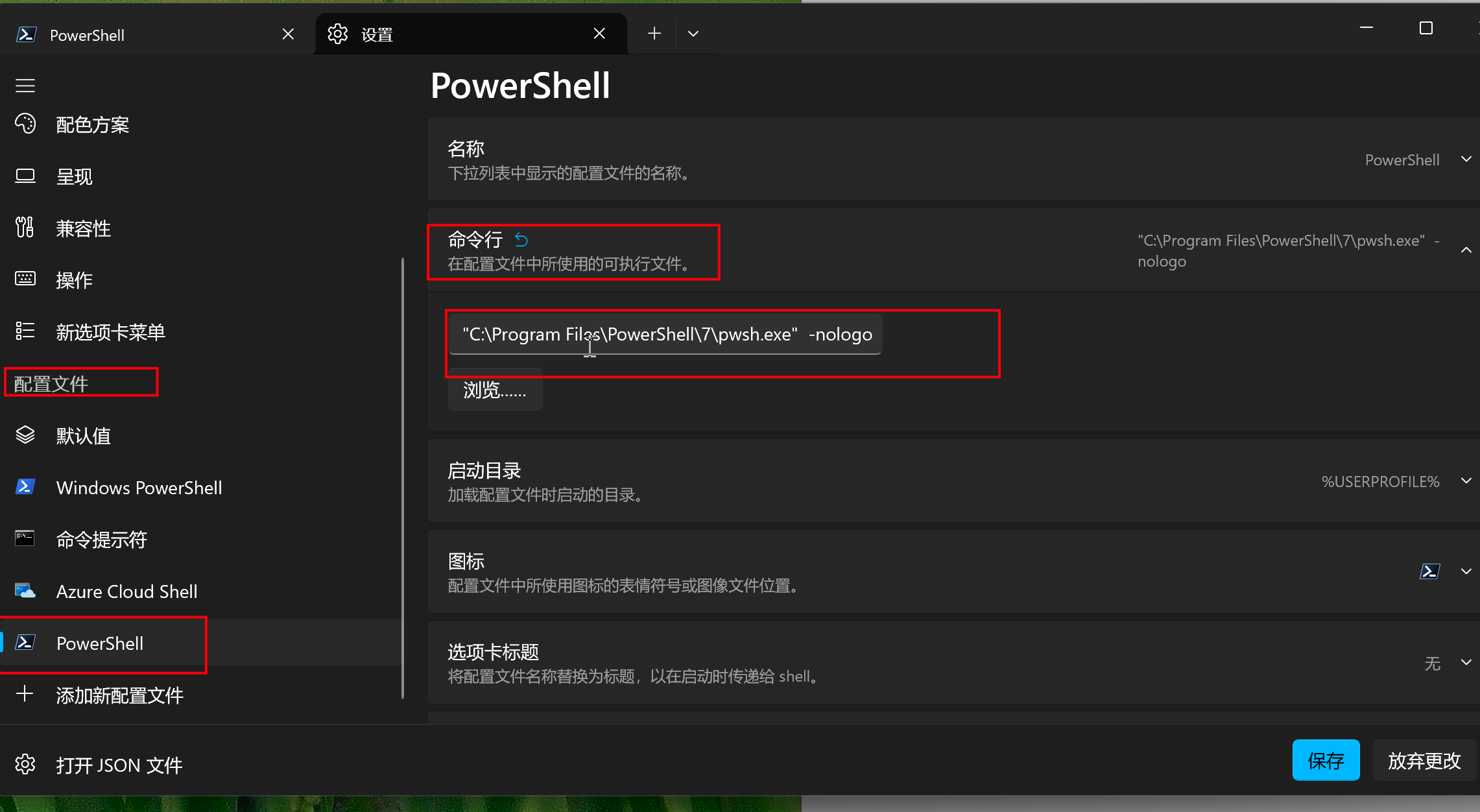
- 重新启动终端就不会有PowerShell的字样输出了
3.6.Sudo以管理员执行
- 安装之后就可以使用
sudo执行管理员权限了
scoop install gsudo3.7.配置代理
在配置文件后面追加如下
set ALL_PROXY=http://xx.xx.xx.xx:7890 # 换成自己的魔法3.8.防止手误,ll别名
- 在配置文件中加入如下命令
Set-Alias ll Get-ChildItem3.9.Git命令简化
- 安装 posh-git
Install-Module posh-git -Scope CurrentUser -Force- 在配置文件中追加如下内容
Import-Module posh-git

# ========== 清除可能冲突的别名 ==========
$gitAliasesToRemove = @('gl', 'gp', 'gs', 'gc', 'gcm', 'gal', 'gm')
foreach ($alias in $gitAliasesToRemove) {
    if (Get-Alias $alias -ErrorAction SilentlyContinue) {
        Remove-Item "Alias:\$alias" -Force
    }
}

# 基础命令
function g { git @args }
function gl { git pull @args }
function ga { git add @args }
function gaa { git add --all }
function gap { git add --patch }

# 提交
function gcm { git commit -m @args }
function gcam { git commit -am @args }
function gc { git commit -v }
function gca { git commit -v -a }
function gc! { git commit -v --amend }
function gcan! { git commit -v -a --no-edit --amend }

# 分支
function gb { git branch @args }
function gba { git branch -a }
function gbd { git branch -d @args }
function gco { git checkout @args }
function gcb { git checkout -b @args }
function gsw { git switch @args }

# 日志(使用 gll 而不是 gl 避免冲突)
function gll { git pull @args }  # 拉取
function glog { git log --oneline --decorate --color @args }
function gloga { git log --oneline --decorate --color --all --graph }
function glo { git log --oneline --decorate --color @args }

# 推送(使用 gpp 而不是 gp 避免冲突)
function gpp { git push @args }
function gpf { git push --force-with-lease }

# 状态
function gst { git status @args }
function gss { git status -s }

# 差异
function gd { git diff @args }
function gds { git diff --staged }

# 变基
function grb { git rebase @args }
function grbi { git rebase -i @args }
function grbc { git rebase --continue }

# 储藏
function gsta { git stash push }
function gstp { git stash pop }
function gstl { git stash list }

# 其他实用命令
function gr { git remote -v }
function gcl { git clone @args }
function gcp { git cherry-pick @args }
function gmt { git mergetool }
function gcount { git shortlog -sn }


德國統一象徵 游客 2026-01-24 16:28 回复
吸引人的 旅行者门户网站, 保持
继续努力。真心感谢!